Skip to content
Memory Logo Mark
  • Home
  • GuidesExpand
    • Windows Customization
    • Windows Install & Setup
    • Windows Troubleshooting
    • Windows Optimization
    • Software & Apps
    • Hardware & Diagnostics
  • ProjectsExpand
    • Winhance
    • UnattendedWinstall
  • About
  • Contact
Get Winhance

Memory Logo Mark
Memory's Tech Tips
  • Tutorial for disabling mouse acceleration on Windows 10 and 11 using Registry Editor regedit method
    Windows Customization Tutorials (How to) Windows Optimization

    How to Disable Mouse Acceleration on Windows 10 & 11

    To disable mouse acceleration on Windows 10 and 11, the fastest method is to open Mouse Properties (run main.cpl), go to the Pointer Options tab, and uncheck Enhance pointer precision….

    Read More How to Disable Mouse Acceleration on Windows 10 & 11Continue

  • Windows 11 tutorial for preventing PC monitors from automatically turning off during use
    Windows Customization Tutorials (How to) Windows Optimization

    How to Stop Monitor from Turning Off in Windows 11 (3 Ways)

    To prevent your monitor from turning off in Windows 11, open Settings > System > Power & battery > Screen, sleep & hibernate timeouts and set “When plugged in, turn…

    Read More How to Stop Monitor from Turning Off in Windows 11 (3 Ways)Continue

  • 12 Free Windows Utilities Cover Image
    Windows Customization Windows Optimization

    Free Windows Utilities: 12 Useful Tools Every Windows 10/11 User Should Know About

    These are the 12 free Windows utilities I rely on most: Winhance for ongoing debloat and optimization, UnattendedWinstall for customizing Windows during install, FlyOOBE for installing Windows 11 on unsupported…

    Read More Free Windows Utilities: 12 Useful Tools Every Windows 10/11 User Should Know AboutContinue

  • Debloat Windows 11 WITHOUT Software so it Looks Like LTSC! (Ultimate Guide) Cover Image
    Windows Optimization

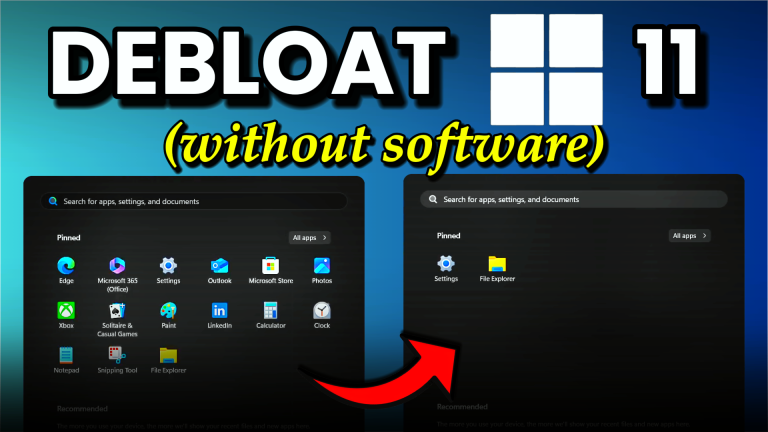
    How to Remove Windows 10 and 11 Bloatware Without Third-Party Software (PowerShell, 2026)

    To remove Windows 10 or 11 bloatware without third-party software, open Settings > Apps > Installed apps for the easy stuff, then use PowerShell Get-AppxPackage … | Remove-AppxPackage for the…

    Read More How to Remove Windows 10 and 11 Bloatware Without Third-Party Software (PowerShell, 2026)Continue

  • Lock Windows Version Cover Image
    Windows Optimization

    How to Disable Automatic Updates on Windows 10/11

    You can lock your Windows 10 or Windows 11 PC to a specific version by creating three registry entries under HKEY_LOCAL_MACHINE\SOFTWARE\Policies\Microsoft\Windows\WindowsUpdate. This blocks automatic major version upgrades (like 23H2 to…

    Read More How to Disable Automatic Updates on Windows 10/11Continue

  • Tools to Create Custom Windows ISO Files Cover Image
    Windows Customization Windows Optimization

    Custom Windows ISO Tools: The Complete 2026 Guide

    Creating a custom Windows ISO lets you remove bloatware, skip setup screens, pre-configure accounts, and inject drivers — all before Windows ever boots. Every tool that does this relies on…

    Read More Custom Windows ISO Tools: The Complete 2026 GuideContinue

  • Windows 11 25H2 Official Bloatware Removal Cover Image
    Windows Optimization

    Windows 11 Bloatware Removal: Official Method in 25H2

    Windows 11 25H2 introduced a built-in Group Policy setting that lets Pro, Education, and Enterprise users remove pre-installed Microsoft Store apps from new user profiles without PowerShell scripts or third-party…

    Read More Windows 11 Bloatware Removal: Official Method in 25H2Continue

  • Enable End Task in Taskbar Cover
    Windows Customization Windows Optimization

    How to Enable End Task in the Windows 11 Taskbar (Hidden Setting)

    To enable the End Task option on the Windows 11 taskbar, open Settings → System → For developers and turn on End Task. After that, right-clicking any pinned or open…

    Read More How to Enable End Task in the Windows 11 Taskbar (Hidden Setting)Continue

  • Winhance v25.05.22 Thumbnail
    Winhance Windows Optimization

    Winhance v25.05.22 Update: Major Improvements to Windows 11 Enhancement Utility

    Winhance v25.05.22 adds digital code signing to both the application and installer, clearer toggle states (green check for enabled, red X for disabled), an HPET toggle for gaming performance, new…

    Read More Winhance v25.05.22 Update: Major Improvements to Windows 11 Enhancement UtilityContinue

  • Winhance thumbnail
    Winhance Windows Customization Windows Install & Setup Windows Optimization

    Winhance: Free Windows 10/11 Enhancement Utility (Open Source)

    Winhance is a free, open-source Windows Enhancement Utility that removes bloatware, disables telemetry, optimizes performance, and customizes Windows 10 and 11 — all from a single application. Download it from…

    Read More Winhance: Free Windows 10/11 Enhancement Utility (Open Source)Continue

Page navigation

Previous PagePrevious 1 2 3 4 5 Next PageNext

memstechtips

Windows tutorials, tools, and honest reviews from a decade of PC repair and end-user support.

Site

Home Blog About Contact Privacy Policy Disclaimer

Projects

Winhance UnattendedWinstall GitHub Support on Ko-fi
YouTube Discord Github X Facebook Instagram TikTok

© 2026 Memory's Tech Tips - WordPress Theme by Kadence WP

  • Home
  • Guides
    • Windows Customization
    • Windows Install & Setup
    • Windows Troubleshooting
    • Windows Optimization
    • Software & Apps
    • Hardware & Diagnostics
  • Projects
    • Winhance
    • UnattendedWinstall
  • About
  • Contact
Search