Skip to content
Memory Logo Mark
  • Home
  • GuidesExpand
    • Windows Customization
    • Windows Install & Setup
    • Windows Troubleshooting
    • Windows Optimization
    • Software & Apps
    • Hardware & Diagnostics
  • ProjectsExpand
    • Winhance
    • UnattendedWinstall
  • About
  • Contact
Get Winhance

Memory Logo Mark
Memory's Tech Tips
  • Windows 11 classic context menu tutorial using Registry Editor regedit method
    Windows Customization

    How to Enable Classic Context Menu in Windows 11 (Regedit)

    To enable the classic Windows 10 right-click context menu on Windows 11, open Terminal, Command Prompt, or PowerShell as administrator and run reg add “HKCU\Software\Classes\CLSID\{86ca1aa0-34aa-4e8b-a509-50c905bae2a2}\InprocServer32” /f /ve. Restart Windows Explorer…
    Read More How to Enable Classic Context Menu in Windows 11 (Regedit)Continue

  • Tutorial for disabling File Explorer search box suggestions on Windows 10 and 11 using Registry Editor
    Windows Customization Tutorials (How to)

    Disable File Explorer Search Suggestions on Windows 10 & 11

    To disable File Explorer search box suggestions on Windows 10 and 11, open Registry Editor, navigate to HKEY_CURRENT_USER\Software\Policies\Microsoft\Windows\Explorer, create a DWORD (32-bit) value named DisableSearchBoxSuggestions, and set it to 1….

    Read More Disable File Explorer Search Suggestions on Windows 10 & 11Continue

  • Tutorial for disabling mouse acceleration on Windows 10 and 11 using Registry Editor regedit method
    Windows Customization Tutorials (How to) Windows Optimization

    How to Disable Mouse Acceleration on Windows 10 & 11

    To disable mouse acceleration on Windows 10 and 11, the fastest method is to open Mouse Properties (run main.cpl), go to the Pointer Options tab, and uncheck Enhance pointer precision….

    Read More How to Disable Mouse Acceleration on Windows 10 & 11Continue

  • Windows 11 disable Sticky Keys using Registry Editor tutorial guide for accessibility settings modification
    Windows Customization Tutorials (How to)

    How to Disable Sticky Keys on Windows 10 and 11 (Registry Method)

    To permanently disable Sticky Keys on Windows 10 or 11 using Registry Editor, navigate to HKEY_CURRENT_USER\Control Panel\Accessibility\StickyKeys, change the Flags value to 506, and add a new string value named…

    Read More How to Disable Sticky Keys on Windows 10 and 11 (Registry Method)Continue

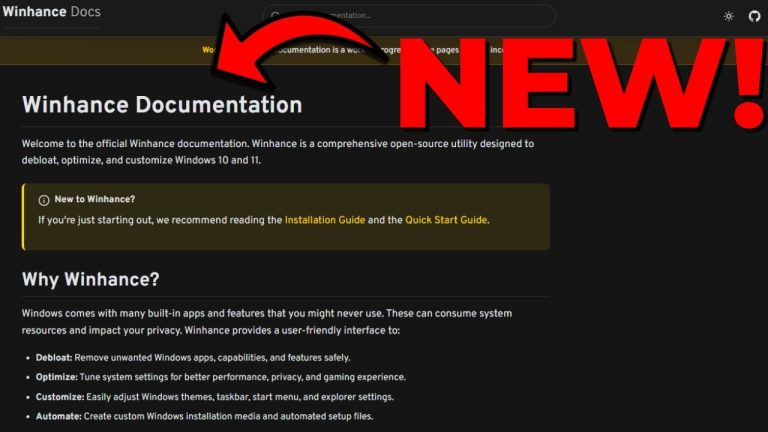
  • Winhance Docs comprehensive guide covering all features and documentation for Windows customization tool
    Winhance

    Introducing Winhance Docs – All You Need to Know About Winhance!

    The first version of the official Winhance documentation is now live at winhance.net/docs. It covers every feature in the app, lists the exact registry paths and power-config commands each setting…

    Read More Introducing Winhance Docs – All You Need to Know About Winhance!Continue

  • Windows 10 tutorial for centering taskbar icons and Start Menu customization guide
    Windows Customization Tutorials (How to)

    How to Center Taskbar Icons and Start Menu on Windows 10

    To center taskbar icons and the Start menu on Windows 10, install ExplorerPatcher from its official GitHub releases page. After installing, right-click an empty area of the taskbar, choose Properties,…

    Read More How to Center Taskbar Icons and Start Menu on Windows 10Continue

  • Windows 10 search bar customization tutorial for Windows 11
    Windows Customization Tutorials (How to)

    Get the Windows 10 Search Bar on Windows 11 (2 Methods)

    To get the Windows 10 search bar on Windows 11, install ExplorerPatcher from its GitHub releases page, right-click the taskbar, open Properties, and set Taskbar style to Windows 10 with…

    Read More Get the Windows 10 Search Bar on Windows 11 (2 Methods)Continue

  • Mandatory security updates causing PC issues and troubleshooting broken Windows systems
    Windows Troubleshooting

    Windows 11 January 2026 Update (KB5074109) Issues & Fix

    The January 2026 Windows 11 update KB5074109 caused remote desktop failures, Windows 11 23H2 shutdown problems, classic Control Panel crashes, and reports of random black screens. If you are still…

    Read More Windows 11 January 2026 Update (KB5074109) Issues & FixContinue

  • Tutorial showing how to disable Windows Spotlight feature on Windows 11 for lock screen customization
    Windows Customization Tutorials (How to)

    How to Disable Windows Spotlight on Windows 11 (3 Methods)

    To disable Windows Spotlight on Windows 11, open Settings > Personalization > Background, click the Personalize your background dropdown, and change it from Windows Spotlight to Picture, Solid color, or…

    Read More How to Disable Windows Spotlight on Windows 11 (3 Methods)Continue

  • Uninstall Windows Updates Cover Image
    Tutorials (How to)

    How to Uninstall Windows 11 Updates and Clear the Update Cache (4 Methods)

    To uninstall a Windows 11 update and stop it from reinstalling, open Settings > Windows Update > Update history > Uninstall updates, remove the update, then stop the Windows Update…

    Read More How to Uninstall Windows 11 Updates and Clear the Update Cache (4 Methods)Continue

Page navigation

Previous PagePrevious 1 … 3 4 5 6 7 … 26 Next PageNext

memstechtips

Windows tutorials, tools, and honest reviews from a decade of PC repair and end-user support.

Site

Home Blog About Contact Privacy Policy Disclaimer

Projects

Winhance UnattendedWinstall GitHub Support on Ko-fi
YouTube Discord Github X Facebook Instagram TikTok

© 2026 Memory's Tech Tips - WordPress Theme by Kadence WP

  • Home
  • Guides
    • Windows Customization
    • Windows Install & Setup
    • Windows Troubleshooting
    • Windows Optimization
    • Software & Apps
    • Hardware & Diagnostics
  • Projects
    • Winhance
    • UnattendedWinstall
  • About
  • Contact
Search